Automatic Product Documentation Library
Client
Apator Group
Industry
Energy
Technologies
 Drupal
Main benefit
Automatic technical documentation management and providing users with easy access to product files

What Challenge Did the Client Face?
Apator Group had hundreds of scattered, unorganized files, such as manuals, certificates, and product data sheets. This created a significant challenge for administrators and editors – manually assigning documents to each product would have been inefficient.
Documentation updates were particularly error-prone, as each change would require re-verification of file-to-product links. Without any automation, this would have meant significant time losses for editors and a high likelihood of documentation inconsistencies.
How Did We Solve the Problem?
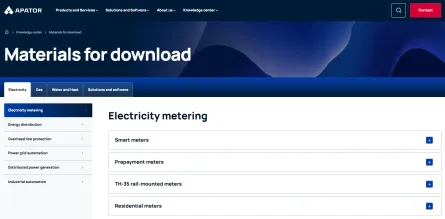
We created a file library based on the product category structure. It allowed editors to upload documents to a central repository, and Drupal will automatically "comprehend" the connections and assign the appropriate file (e.g., a certificate in PDF format) to specific products and sections on the website.
In practice, this means the file will automatically appear in the right places without manual intervention.
Benefits for Apator Group
Our solution provided two main benefits:
- For administrators and editors – significantly simplified content management. Editing a single file updates it in all related locations, which speeds up work.
- For users – intuitive, quick access to full technical documentation. It means they don't have to browse the entire website.
The file library system was therefore a hit, since it improved not only the editors’ work efficiency but also the user experience.
Expert commentary
The key to success was designing a coherent information architecture. We leveraged Drupal's advanced features to ensure files weren't just "attachments" but standalone objects. This allows administrators to upload, for example, a single gas meter certificate and have it automatically published across the entire product branch. This way, we reduced the tedious manual work for editors and ensured full data consistency on the website.

When Is It Worth Implementing a Similar Solution?

When your offer is extensive, and you need to correctly assign files to product pages on a regular basis.
When the product documentation changes frequently.
When your website has an expanded category structure, and you need a shared library for all files.
Want to automate file management on your website?