Integration with OpenWeather
Client
MBFO
Industry
Education/Local government
Technologies
 Drupal
Main benefit
Displaying the current weather forecast on various websites without additional costs

What Challenge Did the Client Face?
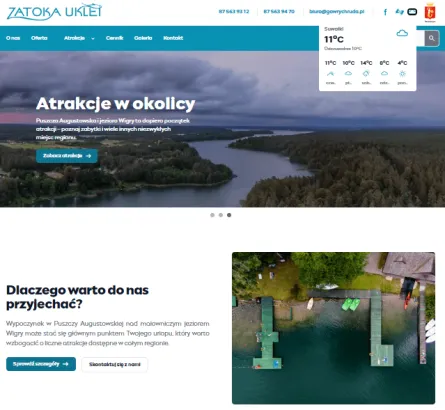
We worked on migrating over 60 Municipal Education Finance Office websites to the new platform. These included numerous recreational resort websites, built using various technologies. They displayed weather forecasts for the next few days for a specific location. As part of this work, we had to replicate this functionality in Drupal 11, providing users with access to the same data they had previously seen on every website:
- current temperature,
- weather conditions such as sun, cloudiness, rain, or snow.
The solution had to ensure that the forecast was displayed separately on each page, based on the provided location.
What Did the Implementation Involve?
To solve the problem, we created a custom Drupal module that enabled the display of a block with current weather data on every website. We made sure adding the widget is as simple as possible – editors only need to select the location and enable the block’s visibility. It’s manageable for every editor.
The module downloads weather data from OpenWeather – a platform that offers a complimentary plan with 1,000 queries a day. Most importantly, the forecast on the website is up-to-date and doesn’t exceed the daily limit. If 1,000 queries are received on a given day, the weather data will stop updating, and when the limit resets, it will start refreshing again.
We built our solution while working on a new platform designed to manage MBFO websites, so the module is tailored to the specifics of administering multiple sites on a single platform.
Benefits for MBFO
Thanks to this module, users gained easy access to the current weather forecast for the upcoming days. Editors have the ability to add the widget to every webpage – regardless of the resort location and with no additional cost.
Importantly for site administrators, managing this module is reduced to just two steps:
- selecting the location,
- enabling block visibility.
Its management doesn’t require a developer’s assistance, making it much easier to add it to websites.
A key decision was selecting a weather data source that provided temperature forecasts and information on atmospheric conditions. At the same time, we wanted to obtain the data free of charge. Another key decision that ensured the implementation's success was the selection of appropriate data-download schedules. We wanted to ensure it was up-to-date without exceeding the free plan's query limits.





When Is It Worth Implementing a Similar Solution?

When you want to present users with up-to-date information for different locations.
When your website needs to automatically retrieve data from another system.
Need a custom website integration?